Protection
Most email clients show you your mail. Box stands guard over it.
The inbox is hostile territory.
Every email you open can leak your location, your device, and the exact moment you read it. Tracking pixels fire silently. Remote images fingerprint your client. Read receipts confirm you're paying attention. Phishing emails impersonate people you trust.
Most email clients do nothing about any of this. They render whatever arrives and hope for the best.
Box takes a different approach. Every message passes through a layered defense system before it reaches your eyes. Some protections work silently in the background. Others surface warnings so you can make informed decisions. All of them are on by default.
Tracking Pixel Blocking
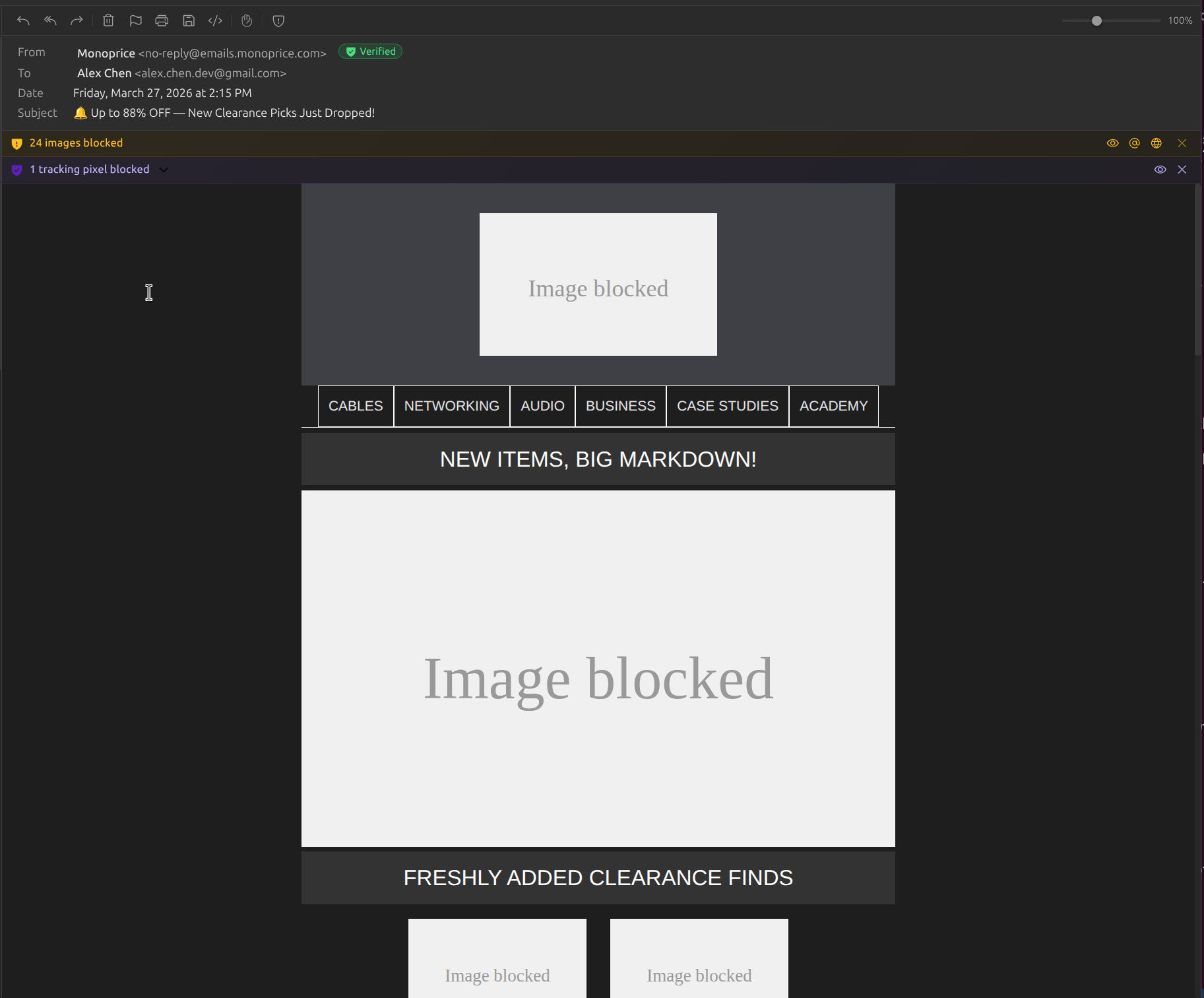
Marketing emails and newsletters routinely embed invisible 1x1 pixel images that phone home when you open a message. These pixels report your IP address, location, device type, and the exact time you read the email.
Box detects and neutralizes tracking pixels before they can fire. The email renders normally; you just don't get surveilled.
- Detects hidden 1x1 images, zero-opacity elements, and off-screen pixel tricks
- Blocks known tracker domains used by email marketing platforms
- Strips tracking parameters from image URLs
- Visual indicator shows how many trackers were blocked per message
Remote Image Blocking
Remote images aren't just visual content; they're network requests that reveal your IP address and confirm you opened a message. Every image load is a potential data leak.
Box blocks all remote images by default and gives you control over when and how they load.
- All remote images blocked by default. No silent network requests
- One-click "Load Images" button when you choose to view them
- Per-sender trust settings so you can allow images from senders you trust
- Inline/CID-attached images always display; they're already local
Suspicious Sender Detection
Phishing doesn't succeed because of sophisticated hacking. It succeeds because a display name says "Your Bank" and most people never check the actual address. Box goes far beyond simple display name checks.
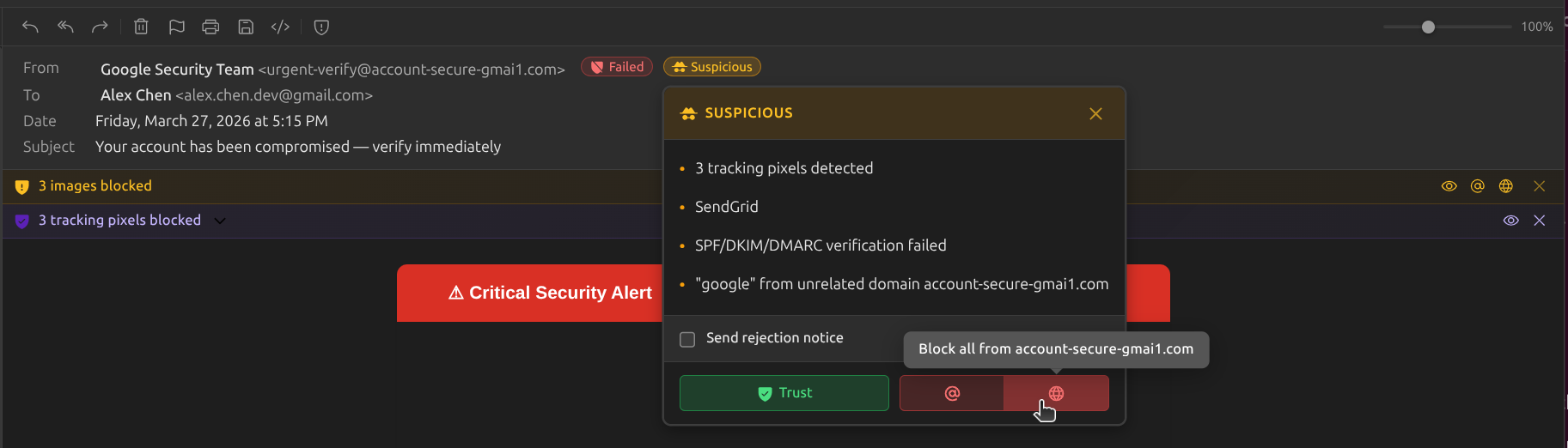
A multi-signal threat scoring engine analyzes every incoming message across seven independent indicators. It requires two or more signals to trigger, or a single danger-level signal, to minimize false positives while catching real threats.
- Authentication failures: flags messages that fail SPF, DKIM, or DMARC verification
- Brand impersonation: detects display names mimicking ~50 well-known brands (banks, tech companies, shipping carriers, airlines, government agencies)
- Suspicious domain analysis: identifies gibberish domain names, excessive consonants, digits, or hyphens
- Bulk sender fingerprinting: recognizes 30+ email service provider signatures (SendGrid, Mailchimp, Amazon SES, HubSpot, and more)
- Low engagement scoring: surfaces senders who've sent 5+ emails you've never opened
- Display name and domain mismatch detection
- Never flags your contacts or explicitly trusted senders
Email Authentication Badges
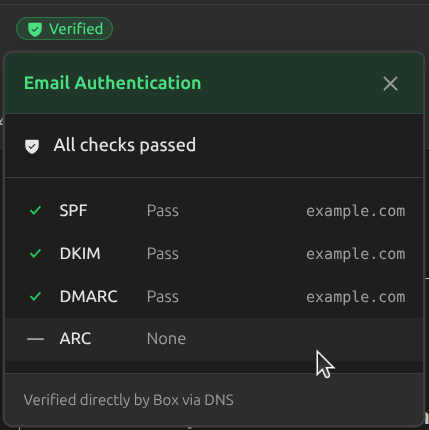
SPF, DKIM, and DMARC are the email world's ID checks. They verify that a message actually came from the domain it claims to be from. But most clients bury this information in raw headers.
Box surfaces authentication results as clear, color-coded badges you can see at a glance.
- SPF badge: confirms the sending server is authorized by the domain
- DKIM badge: verifies the message wasn't altered in transit
- DMARC badge: confirms the domain's published policy was satisfied
- Color-coded pass/fail/missing indicators for each protocol
These badges are part of Box's structured email header viewer, a full interactive breakdown of routing, identity, and authentication for every message.
Read Receipt Suppression
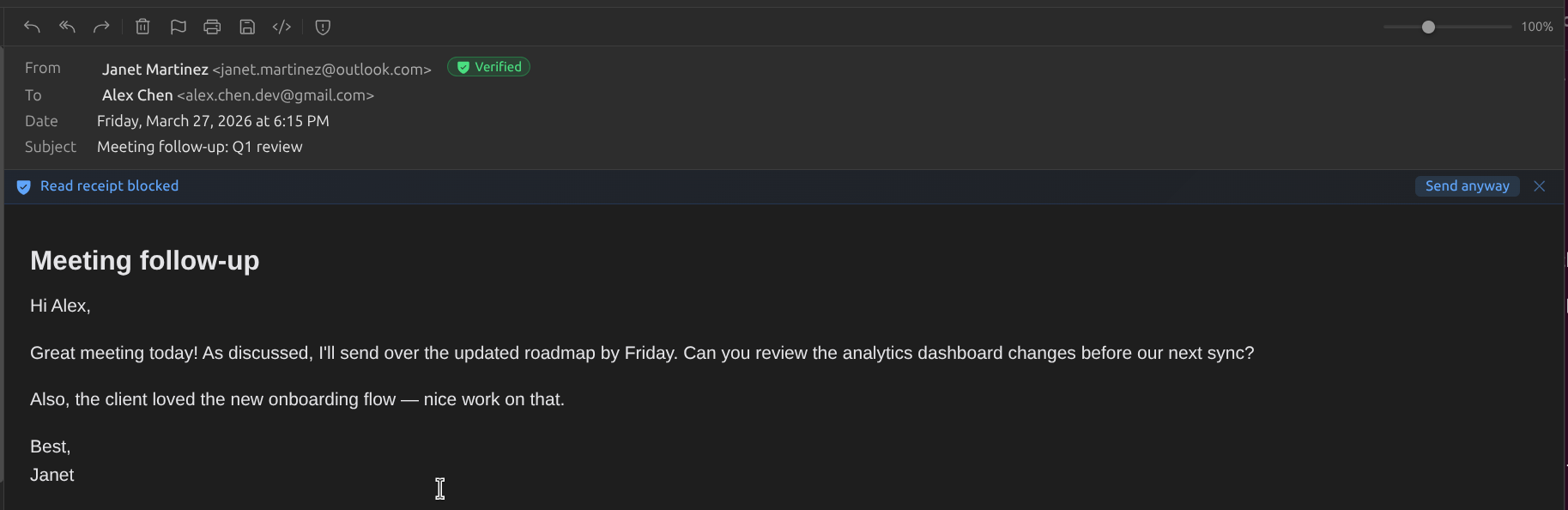
Some senders request read receipts: automatic notifications that confirm exactly when you opened their message. These receipts are sent without your knowledge in many email clients.
Box suppresses read receipt requests by default. You decide when someone deserves confirmation, not them.
- MDN (Message Disposition Notification) requests silently suppressed
- No automatic "read" confirmations sent to anyone
- Option to send receipts manually when you choose to
- Works alongside tracking pixel blocking for complete read-state privacy
One-Click Unsubscribe
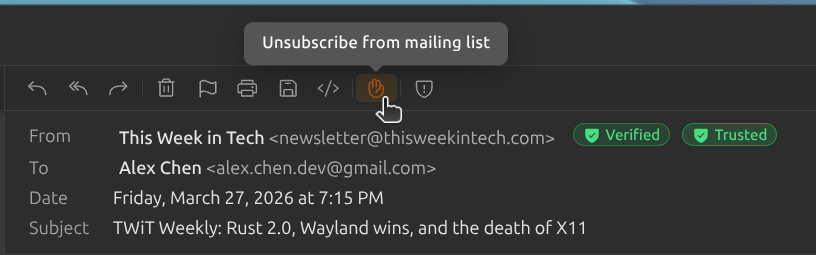
Mailing lists bury their unsubscribe links in tiny gray text at the bottom of the email. Some don't include one at all. Box detects the standard List-Unsubscribe headers that these senders are required to include and surfaces them as a single, obvious action.
When an unsubscribe option is available, a notification bar appears at the top of the message. One click and you're done.
- Detects List-Unsubscribe and List-Unsubscribe-Post headers (RFC 2369 / RFC 8058)
- Priority system: tries one-click POST first, then mailto, then HTTPS GET
- Notification bar appears only when a valid unsubscribe method is found
- No hunting for tiny links. No loading external unsubscribe pages. Just one click.
Bounce Handling
Delivery failure notifications are some of the most confusing emails you'll ever receive. Cryptic SMTP codes, nested MIME structures, and technical jargon that tells you nothing useful.
Box detects bounce messages automatically and translates them into plain language with actionable advice.
- Detects RFC 3464 Delivery Status Notifications using multiple signals
- ~50 enhanced SMTP status code mappings translated to human-readable explanations
- Severity and category badges: permanent failure, temporary issue, policy rejection
- Extracts failed recipients, remote server details, and diagnostic messages
HTML Sanitization
HTML emails can contain JavaScript, form elements, iframes, and other active content that has no business being in your inbox. These aren't features; they're attack vectors.
Box sanitizes every HTML email before rendering, stripping anything that could execute code or exfiltrate data.
- All JavaScript stripped before rendering. No script execution
- Forms, iframes, and embedded objects removed
- Event handlers (onclick, onload, etc.) neutralized
- Shadow DOM isolation prevents email CSS from affecting the application
Trust Center
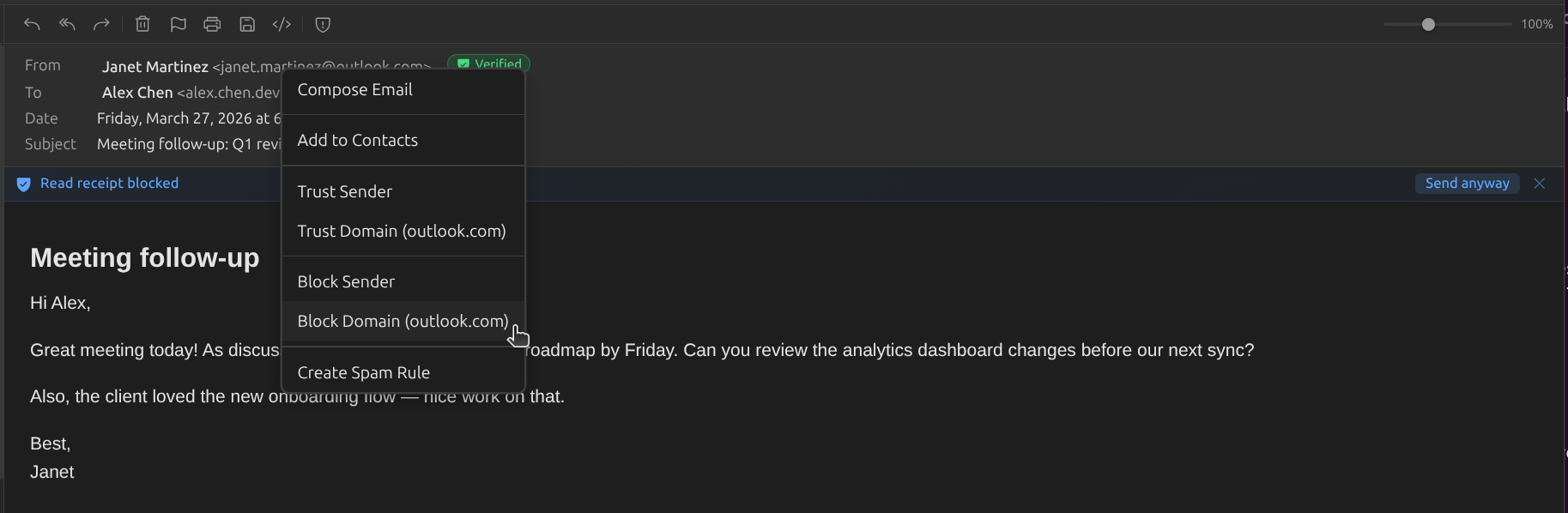
Not all senders deserve the same level of trust. Box gives you a full command center for managing exactly who gets through and who gets blocked, with wildcard patterns, statistics, and a complete activity log.
Block entire domains, trust specific senders, or create fine-grained wildcard patterns. Every action is logged, and every rule can be toggled on and off without deleting it.
- Block by email address, domain, or wildcard pattern (e.g.,
*@*.firebaseapp.com) - Trust senders or domains to bypass suspicious sender analysis and load remote images
- Statistics dashboard: total blocked, today/week/month counts, top blocked senders, sparkline trends
- Activity log: chronological record of all block, trust, and rule actions
- Enable/disable toggles to temporarily suspend rules without deleting them
- Major domain warnings: alerts when accidentally blocking Gmail, Outlook, or other large providers
Banishment
Unsubscribe links don't always work. Some senders ignore them entirely. For the senders that won't take the hint, Box gives you a harder option.
Banished senders are silently removed from your view. Their messages are automatically moved out of your inbox. No notifications, no clutter, no trace.
- Banish any sender with one click. All future messages auto-archived
- Banished senders get no read receipts, no image loads, no engagement signals
- Existing messages from banished senders can be bulk-removed
- Easily review and unbanish from the Trust Center
Smart Warnings
Context-aware alerts that help you spot problems before they become incidents.
Suspicious links
Warns when a link's display text doesn't match its actual destination, a common phishing technique.
Unknown senders
First-time senders are flagged so you can evaluate new contacts before engaging.
Authentication failures
Emails that fail SPF, DKIM, or DMARC checks get a clear warning; the message may not be from who it claims.
Everything, accounted for.
Every protection action Box takes is visible and verifiable. No black boxes.
Tracking Pixels Blocked
Invisible spy pixels detected and neutralized before they can phone home.
Remote Images Held
No images load until you say so. Your IP stays private.
Suspicious Senders Flagged
Display name mismatches and impersonation attempts called out instantly.
Authentication Verified
SPF, DKIM, and DMARC results shown as clear, color-coded badges.
Read Receipts Suppressed
No silent confirmations. You read on your terms, not theirs.
HTML Sanitized
Scripts, iframes, and attack vectors stripped before rendering.
Per-Sender Trust Levels
Granular control over what each sender is allowed to do.
Banishment
One click and a sender is gone. No trace, no notifications, no mercy.
One-Click Unsubscribe
Mailing list headers detected. One click to opt out, no hunting required.
Bounces Decoded
Delivery failures translated into plain language with actionable advice.
On by Default
Every protection active from the first launch. Zero configuration required.